
How to Set Up an Inflatable Photo Booth
Table of Contents
- What You’ll Need: Photo Booth Equipment Checklist
- Understanding Your Inflatable Photo Booth Components
- Step 1: Prepare Your Space and Inspect Equipment
- Step 2: Position the Inflatable Structure
- Step 3: Install LED Lighting and Customize Your Setup
- Step 4: Activate the Blower and Test All Systems
- Inflatable Photo Booth Rental Setup Considerations
- Common Setup Mistakes to Avoid and Maintenance Best Practices
- Frequently Asked Questions
Last Updated: September 22, 2026
What You’ll Need: Photo Booth Equipment Checklist
Setting up an inflatable photo booth requires careful planning and the right equipment on hand before you begin.
Before unpacking anything, gather these essentials:
- The inflatable enclosure itself (typically 8×8 or 10×10 feet)
- Blower unit with power cord
- LED lighting strips or panels
- Remote control for lighting adjustments
- Storage bag or carrying case
- Zipper door (if separate from enclosure)
- Power extension cords (minimum 50 feet recommended)
- Duct tape or repair kit
- Instruction manual specific to your model
Having everything organized before you start prevents mid-setup scrambling. When considering inflatable photo booth rental packages, look for providers that include all necessary equipment, eliminating compatibility issues and ensuring every piece works together seamlessly.
Check that all items are present and undamaged before proceeding. A quick visual inspection of seams, zippers, and electrical components takes five minutes and saves hours of troubleshooting later.
Understanding Your Inflatable Photo Booth Components
An inflatable photo booth is a system of interconnected parts. Understanding each component helps you troubleshoot problems and optimize performance during your event.
The Inflatable Enclosure Structure and Material Selection
The inflatable enclosure is the physical structure guests step into for photos. Material choice affects durability, weight, maintenance, and long-term cost.
Oxford Cloth vs. PVC: A Material Comparison
Oxford Cloth (600D or 900D denier polyester): 8-12 lbs, 2-4 years durability, $1,200-$2,500. Best for frequent transport and indoor events. Degrades under UV exposure and high humidity.
Reinforced PVC (vinyl-coated polyester): 15-25 lbs, 4-7 years durability, $2,000-$4,500. Best for outdoor events and high-volume use. Stiffer in cold weather and more expensive to repair.
Seam Construction and Stress Points
Seams are the critical failure point. When inspecting, check for heat-sealed seams (most durable), stitched seams reinforced with tape (good durability), or glued seams only (weakest).
A standard 8×8 foot inflatable photo booth accommodates 2-4 people per photo, while larger 10×10 models handle 4-6 people.
The floor space required for setup is typically 10×10 feet for an 8×8 booth. Measure your venue before committing to ensure adequate space.
Test the zipper door mechanism before your event. Sticky or misaligned zippers frustrate guests and slow down the photo process. A quick spray of silicone lubricant keeps zippers operating smoothly. For Oxford cloth booths, check zippers monthly during heavy-use seasons; PVC zippers require less frequent maintenance.
Blower Unit and Power Requirements
The blower unit is the heart of your inflatable photo booth system. Most blower units require a standard 110-120V electrical outlet and draw 5-10 amps of power.
A typical inflatable photo booth blower needs a dedicated outlet or heavy-duty extension cord. Never daisy-chain multiple extension cords. A single 50-foot extension cord rated for 15 amps is standard.
The blower runs continuously throughout your event. Outdoor events require weatherproof outlets or generators; indoor venues need accessible outlets near your setup location.
Most blower units produce 70-80 decibels of noise. Position the blower away from the photo booth interior with air intake directed toward the enclosure to reduce noise exposure.
Step 1: Prepare Your Space and Inspect Equipment
Before inflating, prepare your venue and conduct a thorough equipment inspection to prevent equipment failure and ensure guest safety.
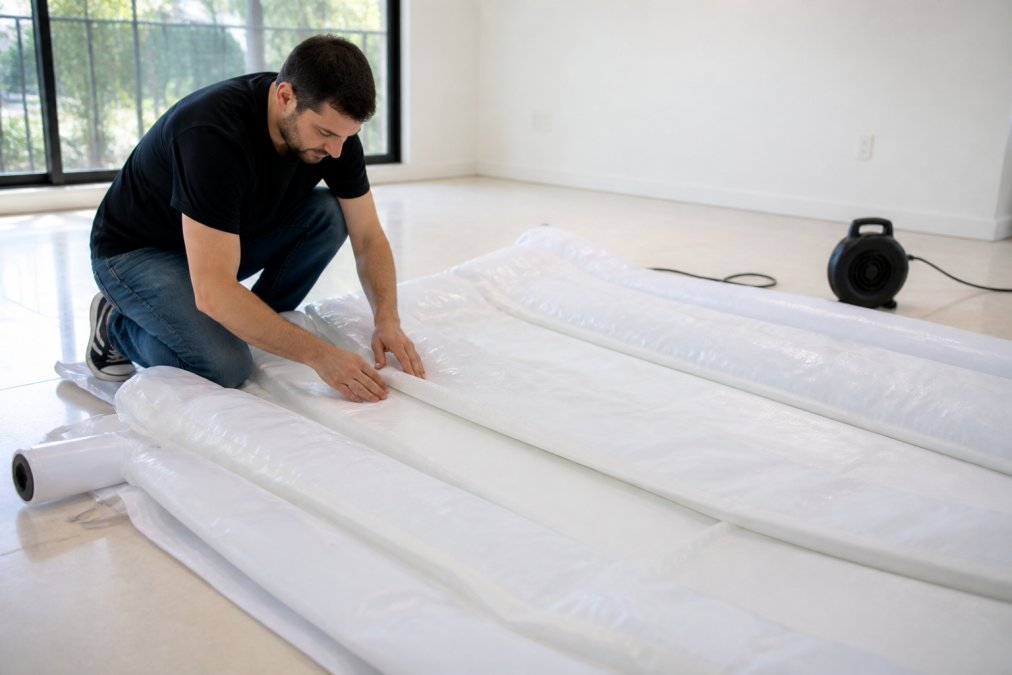
Clear the setup area of debris, sharp objects, sticks, gravel, or broken glass. Even small punctures compromise the integrity of your inflatable photo booth.
Inspect the enclosure for tears, holes, or seam separation. Check the zipper door for smooth operation, test LED lighting connections, and verify the blower unit turns on and produces adequate airflow.
Lay out all components in the setup area to prevent delays during installation.
For outdoor setup, check weather conditions. Ideal conditions are 50-80°F with minimal wind; avoid temperatures below 40°F and high winds.
Step 2: Position the Inflatable Structure
Proper placement ensures good lighting, adequate ventilation, and safe guest access.
Place the enclosure on level ground. If your venue has slight slopes, position the booth so the opening faces downhill for better access.
Position the blower unit outside the enclosure with air intake away from guests and air output toward the enclosure opening. Leave at least 2 feet of clearance for proper airflow.
Orient the zipper door toward foot traffic. In indoor venues, position the door facing the main event space; outdoors, orient it away from wind direction when possible.
Secure the inflatable photo booth outdoors with stakes or weighted bags at the corners to prevent wind from shifting the structure.
Never set up an inflatable photo booth on grass or dirt without inspection. Moisture, insects, and sharp plant debris damage the material. Use a tarp underneath if the ground is wet or contaminated.
Step 3: Install LED Lighting and Customize Your Setup
LED lighting ensures photos are bright, flattering, and consistent throughout your event.
Most inflatable photo booth models feature internal LED strips. Connect the LED lighting power cord to your extension cord system before inflating the enclosure.
Customize lighting using the remote control. White light (5000K) provides neutral, professional results; warm white (3000K) creates an intimate atmosphere; RGB options add fun to corporate events.
Test all lighting modes before guests arrive. Ensure brightness is adequate and adjust positioning to minimize shadows.
Add external lighting if your venue is dark to illuminate the background and entry area.
The remote control allows real-time adjustments during your event, changing colors and brightness based on conditions.
Step 4: Activate the Blower and Test All Systems
Before guests arrive, run a complete system test to prevent failures during your event.
Plug the blower unit into the power source. Listen for steady humming and watch the enclosure inflate fully over 2-3 minutes.
Test the zipper door for smooth operation. If it sticks, apply silicone lubricant and test again.
Activate the LED lighting system and cycle through all color and brightness options. Test the lighting from inside the enclosure to ensure adequate illumination.
Take a test photo if your booth includes a camera or phone mounting system. Make any adjustments to lighting or positioning based on the test image.
Monitor the blower unit temperature. If it becomes uncomfortably hot to touch, turn it off and let it cool, as this indicates potential overheating.
Never leave the blower running unattended for extended periods. Turn it off during breaks or when the booth isn’t in use. This extends equipment life and reduces electricity consumption during your event.
Inflatable Photo Booth Rental Setup Considerations
If you’re renting an inflatable photo booth, inquire about professional setup for rental packages, which can eliminate DIY complexity.
When renting, confirm delivery and setup timing with the rental company.
Confirm cleanup and breakdown procedures with the rental company.
Common Setup Mistakes to Avoid and Maintenance Best Practices
These are the most frequent problems that derail inflatable photo booth setups, along with essential maintenance steps to extend equipment life.
Post-Event Cleaning and Storage
Proper maintenance extends equipment life significantly. Most failures stem from improper storage and neglected cleaning.
Immediate Post-Event Care (Within 2 Hours)
- Turn off the blower and allow the enclosure to deflate naturally.
- Remove any trash, confetti, or spilled food before cleaning.
- Wipe down interior surfaces with a damp microfiber cloth and mild dish soap.
- Clean the zipper door thoroughly with an old toothbrush and soapy water.
- Inspect seams and material for tears, punctures, or separation.
- Dry all components completely before packing to prevent mildew.
Weekly Maintenance (If Renting or Using Frequently)
- Check all seams for separation or stress cracks
- Test the blower unit for unusual sounds or reduced airflow
- Verify LED lighting connections and inspect the zipper door for smooth operation
- Wipe down any visible dust or residue
Storage Best Practices
Minor Repairs and Troubleshooting
Small Punctures (Less Than 1/4 Inch)
Small punctures in Oxford cloth or PVC can be patched without professional repair. Most inflatable photo booth kits include a repair patch kit with adhesive. Clean the area around the puncture, dry completely, apply the adhesive patch, and allow 24 hours to cure before inflating. Test the repair by inflating the booth and listening for air leaks near the patch.
Seam Separation
Blower Motor Issues
Zipper Sticking or Misalignment
Regular maintenance extends equipment life significantly. For rental businesses or frequent users, this investment in care directly translates to lower replacement costs and higher profit margins. For personal use, proper maintenance ensures your inflatable photo booth remains reliable.
Frequently Asked Questions
How do you set up an inflatable LED photo booth?
Begin by selecting a flat, clean floor space away from sharp objects. Unfold the inflatable enclosure and position it in your desired location. Connect the blower unit to a standard power outlet and activate it to inflate the structure fully, which typically takes 5-10 minutes. Once inflated, install the LED lighting fixtures inside according to the manufacturer’s instructions, secure the remote control, and test all systems before guests arrive. Ensure the zipper door operates smoothly and all internal illumination functions properly.
What equipment is needed to run an inflatable photo booth?
Essential equipment includes the inflatable enclosure itself, a blower unit for continuous inflation, LED lighting fixtures for internal illumination, a power source (standard 110V outlet), a storage bag for transportation, and a remote control for lighting adjustments. Depending on your setup, you may also need extension cords, a camera or smartphone for capturing photos, backdrop materials, and a tripod or mounting system. Check your specific unit’s manual for any additional components required for plug-and-play operation.
How much does it cost to rent an inflatable photo booth?
Pricing depends on several factors including the booth dimensions, LED lighting customization options, rental duration, delivery distance, and whether professional setup is included. Contact RI Party Store for a custom quote based on your event size, location, and specific requirements. Many rental packages include delivery, setup, and takedown services, so comparing total costs rather than base rental rates helps you understand the real investment for your event.
Are inflatable photo booths safe for outdoor events?
Inflatable photo booths can be used outdoors with proper precautions. Ensure the structure is anchored securely to prevent wind damage, place it on level ground away from sharp objects or rough surfaces, and monitor weather conditions closely. Strong winds, rain, or extreme temperatures can affect the booth’s stability and the durability of Oxford cloth or PVC materials. For outdoor events, verify that your rental unit is rated for outdoor use and ask your rental provider about weather-related safety guidelines and weight capacity limits for your specific location.